Inside an AI Video Production Pipeline: From a Voice-Over Script to a Deliverable Promo Film
CoLenS Studio produced the promotional film for HKtag Smart Campus 2026. The production combined generative AI video technology with professional post-production, delivering high-quality visuals on a materially shorter schedule: AI generated the imagery and visual elements, while professional editing and colour grading gave the film a forward-looking style suited to the "smart campus" theme.
The film uses a concise, direct narrative to present the core ideas and highlights of Smart Campus 2026 to schools and the wider education sector — built to work both on social platforms and on screen at the event itself.
This article walks that pipeline end to end — from a block of script text to a deliverable film. The project also illustrates where CoLenS Studio positions itself in AI video work: using AI to accelerate the creative process while holding professional production standards.
The finished film: HKtag Smart Campus 2026
Every step below refers to this film. If the player does not load, watch it directly here, or browse the CoLenS Studio portfolio.
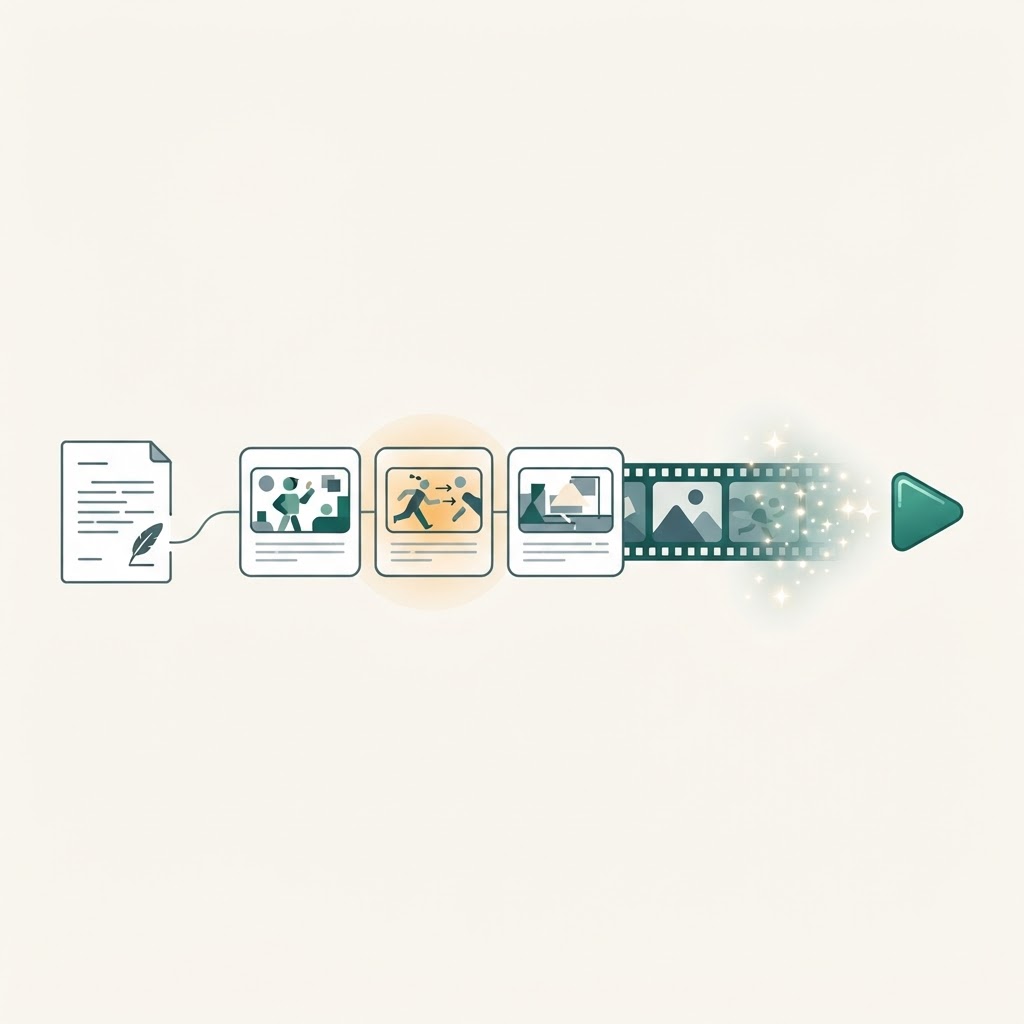
The shape of the pipeline: start from the script, validate through storyboard, and only then generate video.
We have also turned this workflow into teaching material. Our 2026/27 AI Media Production Workshop teaches this pipeline itself, rather than whichever tool happens to be fashionable this month.
One clarification up front: this article is about method and judgement. The specific models, toolchain, prompt templates, generation cost structure and internal management systems are Coxana internal assets and are not disclosed here.
The core principle: validate cheaply before generating expensively
The most common mistake in AI video production is rushing straight to video generation.
Video generation is the most expensive and least predictable stage of the entire pipeline. Regenerating the same shot a dozen times without an acceptable result is normal. So the real craft lies in resolving composition, character, visual direction and narrative pacing before any video generation begins.
Our approach in one line: know what you want → validate it cheaply → get client sign-off → then generate in batch → let a human select → QC and deliver.
Step 1: Lock the content, not the visuals
The pipeline begins with voice-over script confirmation, not with imagining pictures.
At confirmation we verify, item by item: event name, personal names, job titles, dates, venue, organisation names, and the call to action (registration link, website, QR code). These are the details most likely to be wrong and least permissible to get wrong.
There is an important rule here: the cost of changes after script confirmation is asymmetric. A few words that do not affect meaning or duration can be absorbed. But if a whole passage, the language, or the narrative logic changes, the related storyboard and shots must be re-evaluated. This is the single point students most need to internalise — content changes are nearly free early and very expensive late.
Step 2: Human voice-over, not AI voice
Our final voice-over uses a real human recording.
The reason is not only texture. The intonation, pauses and emphasis of a real recording form the rhythmic skeleton of the whole film — every shot length, cut point and lip-sync pass downstream aligns to that audio track.
Two practical habits: the client's original recording is always preserved and never overwritten; and all final voice-over passes through audio enhancement so recordings made in different places and conditions match tonally. Every later stage — animatic, edit, lip sync — uses the enhanced version, so the timeline never shifts because someone swapped the audio track midway.
Step 3: Derive the visuals from the voice-over
With the script confirmed, the next step is analysing the information beat of each line, then deciding what kind of image should carry it:
live-action footage, an AI-generated scene, B-roll, motion graphics, typography, an interface demonstration, or data visualisation.
Two things get flagged at the same time: which shots require a person speaking (these will need lip sync later), and which only need visuals under narration. That distinction drives both post-production workload and cost.
The output is a line-by-line table: script line, visual type, shot ID, characters present, whether graphics are required, estimated duration. That table exists before any image is made.
Step 4: Character consistency — build a character reference set first
The most common AI disaster is the same person becoming a different person from shot to shot.
The fix is not remedial. For every on-screen person we first build a complete character reference: front, left and right three-quarter, full profile, full body, medium shot, close-up, plus neutral and speaking expressions — effectively a three-view set plus wide, medium, close and headshot.
We also record identifying features in writing: hairstyle, wardrobe, face shape, glasses, apparent age, body proportion.
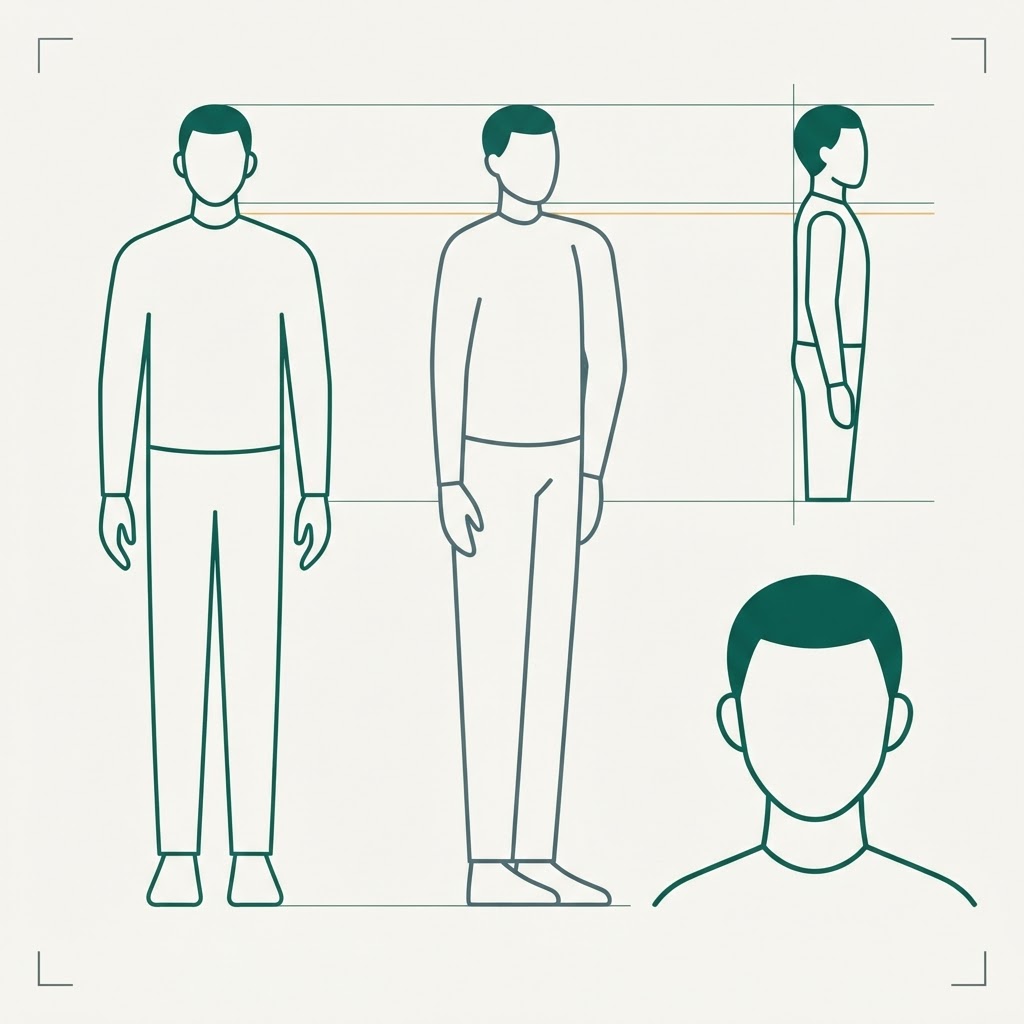
The character reference set: the same person locked down across angles and shot sizes before anything moves.
Then we check each one: does the close-up look like the person? Does the full body still look like them? Does identity hold in profile? In multi-person scenes, is each person clearly themselves? Are height proportions plausible? Is wardrobe consistent?
The more complete the reference photography the client provides, the higher consistency tends to be. This is where time spent on asset collection pays back.
Step 5: Storyboard images — the low-cost exploration stage
Next we generate still storyboard images. The positioning of this stage is explicit: this is exploration, it is cheap, so this is where problems get solved.
We generate and review scene by scene, keeping character and art direction aligned. The things that must match include aspect ratio, colour grade, lighting, lens language, character appearance, wardrobe, production design and overall art direction.
Every storyboard image is screened by hand before it goes anywhere near video generation. AI output does not improve on its own; screening is a human responsibility.
Step 6: The animatic — the decisive gate
This is the most important step in the pipeline, and the one most often skipped.
We assemble the screened storyboard stills + the enhanced human voice-over + temporary music into an animatic, arranged to the intended timing, with simple placeholders where graphics will sit.
No production AI video is generated at this stage.
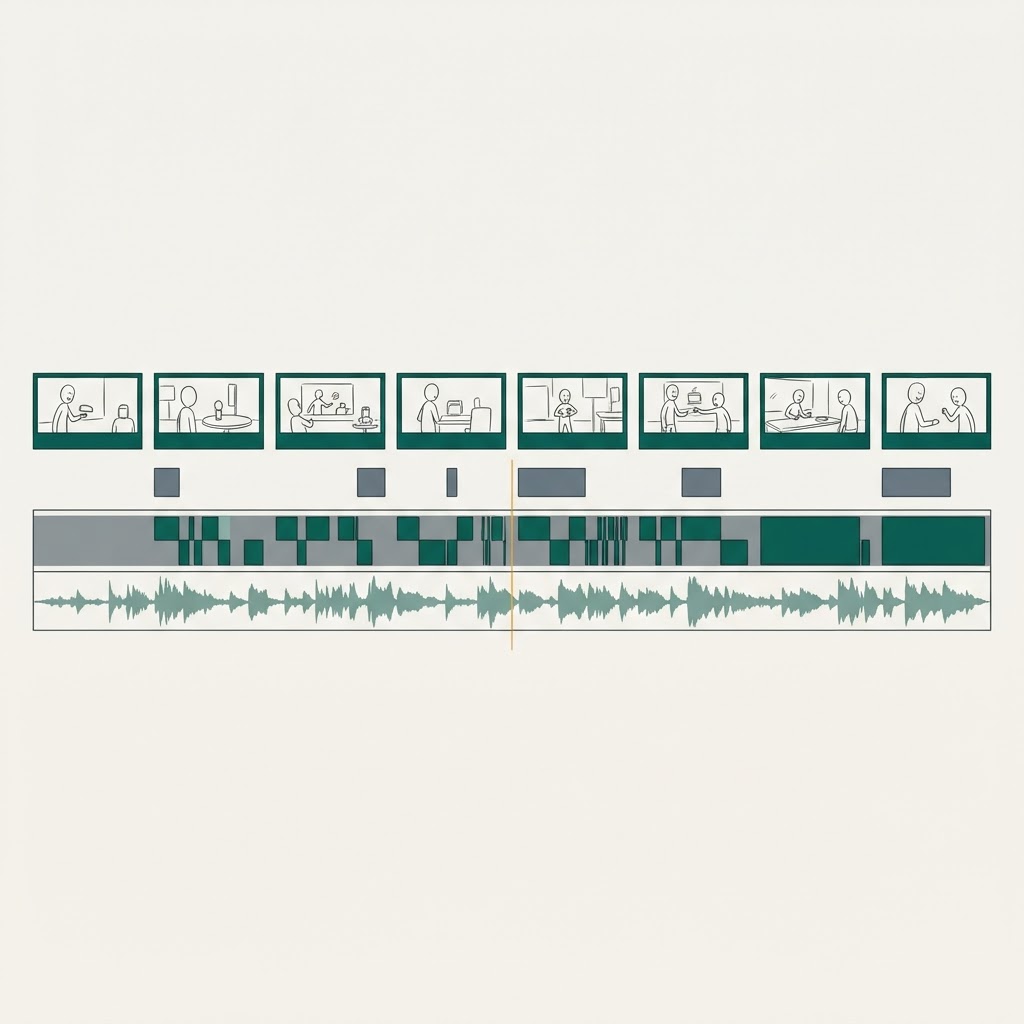
The animatic: stills plus human voice-over plus temporary music — enough to expose problems of narrative and pace.
The client then reviews: story flow, shot order, likeness, visual direction, pace, voice-over, music direction, and which graphics are needed.
Once the client signs off, creative direction is considered locked, and only then does production video generation begin.
Why does this gate matter so much? Because a film cut from stills already reveals whether the narrative works, whether the pace drags, and whether the likeness holds. Fixing those things here costs almost nothing. Fixing them after generation means redoing the work.
Step 7: From image to motion
Only after the lock do we generate video. We work image-to-video — using approved storyboard frames as the visual basis rather than generating from text alone. Composition, character and art direction are already fixed, which removes an enormous amount of variance.
In practice, individual shots run around eight seconds, at 16:9.
One field lesson worth teaching: generation models invent their own cuts. You ask for one continuous take and get three cuts. So the instruction must explicitly demand a single continuous shot, no scene transitions, the same composition and characters, and no new camera angle.
The other habit is to test one representative shot first. We pick the most representative or highest-risk scene from the approved storyboard, run a real generation test, and confirm likeness, motion, camera movement and text clarity all hold before queueing the full batch. One shot's cost buys certainty across the batch.
Step 8: After generation, a human still chooses
Generation can be heavily automated. Selection cannot.
Every result is reviewed across four areas:
Character — face, identity, hands, body proportion, clothing. Hands are a recurring offender.
Motion — naturalness, unexplained speed-ups or slow-downs, dropped frames, whether camera movement makes sense.
Background — melting architecture, distorted logos, crowds morphing into one another, objects vanishing.
Text — accuracy of Traditional Chinese characters, unwanted conversion to Simplified, malformed glyphs, wrong logos. This is a particular pain point for a Traditional Chinese market.
Fixes follow patterns: character drift → adjust the character reference; wrong camera → add camera constraints; unnatural motion → simplify the movement; background errors → adjust the scene or source image; too many cuts → insist on a long take; text errors → switch to a graphic rather than arguing with the model.
One versioning discipline: regeneration never overwrites earlier files. The selected version stays selected until something clearly better appears and a human replaces it deliberately.
Step 9: Lip-syncing the guests
This is the part people are most curious about: making an AI-generated figure "speak" a real human recording.
Order matters — edit the film first, then lip sync, not the other way round.
The sequence: lock the in and out points of the speaking shot during the edit; export that segment on its own; drive the lip sync with the real human recording; substitute the finished segment back into the timeline; then check timing, frames, colour, motion and audio sync.
Framing conditions decide success almost without exception: the mouth must be clearly visible, unobstructed, not too far into profile, not too distant, and head movement must not be violent. These conditions have to be designed at the storyboard stage — if a speaking shot is framed as a wide profile, no amount of post-production will rescue it.
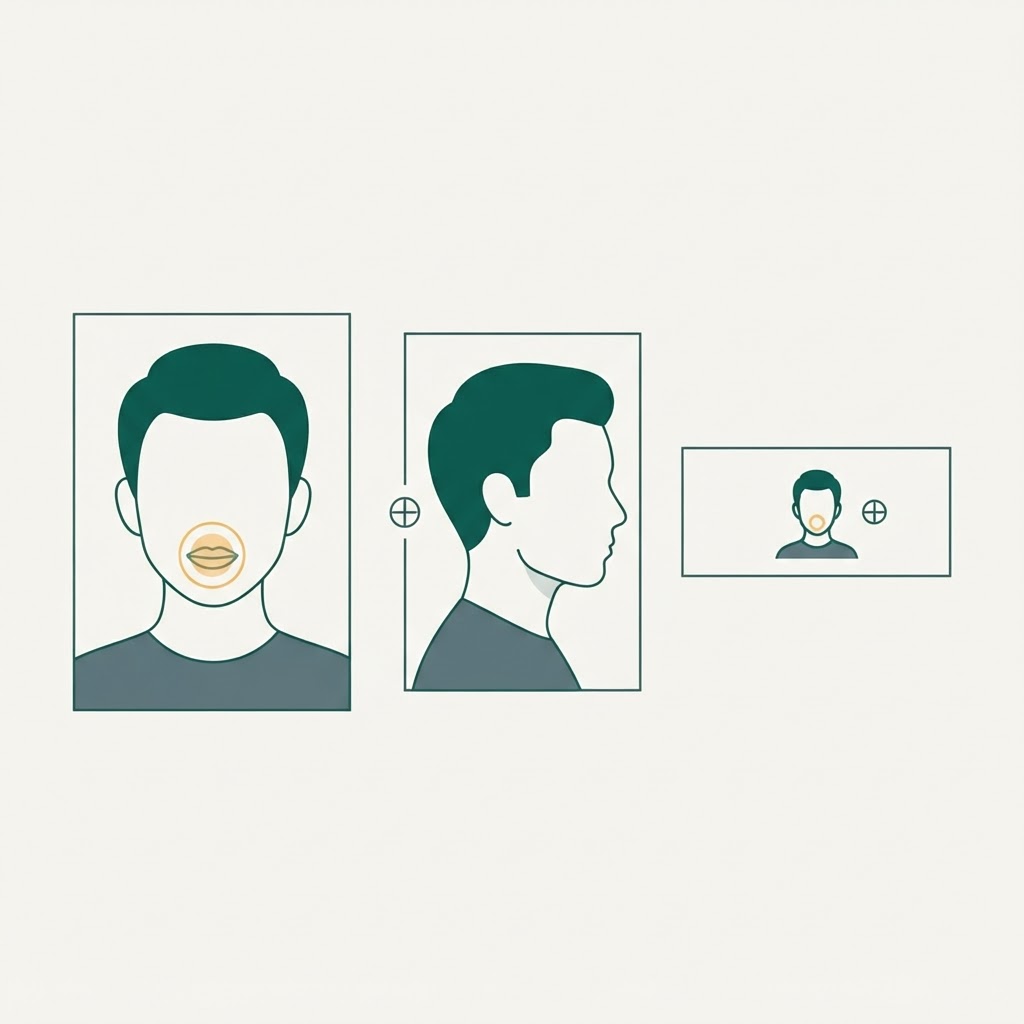
Usable versus unusable speaking-shot framing. This is a storyboard decision, not a post-production one.
Step 10: Critical information is never left to AI
Our position is explicit: accuracy outranks AI purity.
Anything that cannot be wrong is produced as a graphic rather than generated: QR codes, URLs, phone numbers, dates, logos and sponsor marks, speaker names and job titles, event names and calls to action.
Among these, QR codes carry a hard rule: never generate or rewrite one with AI. A QR code's pixel pattern is the data; alter one module and it stops scanning. The original asset must be overlaid. After final export we scan it on a physical device to confirm it opens the correct link, and we hold it on screen for at least four seconds so viewers have time to use it.
Environmental text — street signage in the background — can be left to AI, as long as it reads correctly. Functional text cannot.
Step 11: Subtitles and sound
Subtitles are generated only after the edit and voice-over are complete, so timeline changes do not force a redo. Generated output is always proofread by hand — particularly personal names, company names, event names, English proper nouns and numbers, where automated tools fail most often.
Audio priorities are simple: voice-over first, music never over the voice-over, sound effects and room tone as needed, and a consistent overall listening experience.
Step 12: QC by watching three times
Before delivery we watch the film three different ways, because each one catches different faults:
Silent viewing — picture only. This is for visual continuity, graphics, typos, logos, QR codes and AI artefacts. With the sound off, the eye is far more honest.
Audio only — no picture. This is for voice-over, music, levels, cut points and sync.
Full viewing — as an ordinary viewer. Does the story hold, is the pace comfortable, does the emotion flow, is the call to action clear?
Then the checklist: voice-over matches the approved script; names, titles, event name, date and venue correct; character identity consistent with no visible morphing; camera and motion natural; Traditional Chinese accurate; QR code scannable on a real device; CTA and URL correct; lip sync clean; subtitle proper nouns correct; music not covering the voice-over.
Delivery spec: 1920 × 1080, 16:9, H.264, 30fps, Rec.709.
What the 2026/27 AI Media Production Workshop teaches
Compress the whole pipeline and only three capabilities are worth teaching:
1. Think before you touch a tool. Students start from the voice-over script, break down the information beat line by line, decide the visual strategy and build a shot table. No generation tools are involved in this step at all.
2. Validate creative direction at the lowest possible cost. Students build their own animatic — stills plus voice-over plus music — and screen it to their classmates. Most problems surface here rather than in a finished film.
3. Judgement after generation. Students receive multiple generated versions and practise reviewing them across the four areas — character, motion, background, text — and justifying their choice. This is the core of the workshop: AI generates and accelerates; humans own direction, selection and final judgement.
We do not intend to teach which tool is best. Tools change every few months. Judgement does not.
In one sentence
The point of this pipeline was never "knowing how to use a particular model". It is: know what you want → validate it cheaply → lock it → execute in batch → let a human select the best result → QC → deliver.
AI is an amplifier of execution, not a substitute for creative judgement. The operator has to know what they want before handing execution to a tool.
Want this pipeline in your classroom? See the AI Media Production Workshop, or browse the CoLenS Studio portfolio for more production cases.